A payment succeeds while your customer is still looking at the confirmation screen. Your application needs to update an order, send a receipt, and notify fulfillment without repeatedly asking the payment provider whether anything changed. That is the problem webhooks solve. If you are asking what are webhooks, the short answer is that they are automated HTTP notifications sent from one system to another when a specific event occurs.
Webhooks are a small concept with large architectural consequences. Used well, they reduce polling, shorten response times, and help services react to business events as they happen. Used carelessly, they can introduce duplicate processing, security gaps, and hard-to-debug failures. Understanding both sides is essential for developers building event-driven integrations.
What Are Webhooks and How Do They Work?
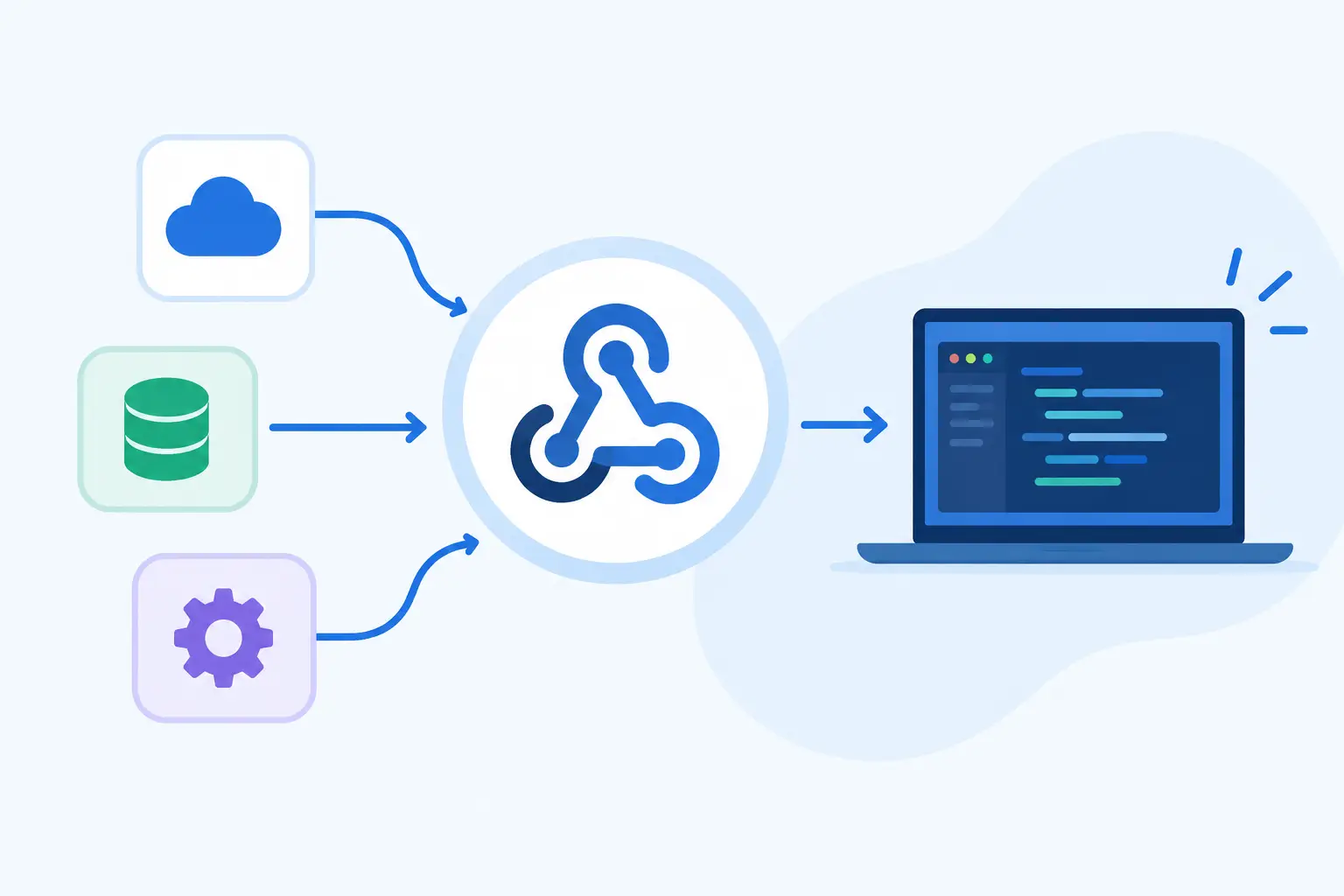
A webhook starts with an event in a source application. That source could be a payment platform, source control service, ecommerce system, identity provider, or internal microservice. When the event occurs, the source sends an HTTP request, usually a `POST`, to a URL your application has registered.
That URL is called a webhook endpoint or callback URL. The request includes a payload with details about the event, often encoded as JSON. Your application receives the payload, verifies that it is legitimate, and takes the appropriate action.
For example, a source control platform can send a webhook when someone pushes code to a repository. A deployment service receives the notification, checks which branch changed, and starts a build only when the change meets its rules. No scheduled job needs to query the source control API every minute.

The basic flow is straightforward:
- An event happens in the sending system.
- The sender makes an HTTP request to your webhook endpoint.
- Your endpoint validates and acknowledges the request.
- Your application processes the event, immediately or through a background queue.
A webhook is therefore an event notification mechanism, not a database synchronization strategy by itself. The payload may contain all the data you need, or it may contain an event ID and a resource reference. In the second case, your service can call the sender’s API to retrieve current details after validating the event.
Webhooks vs. APIs: The Key Difference
APIs and webhooks often work together, but they answer different questions.
With an API, your application initiates the conversation. It requests data or asks another service to perform an action. For example, your backend might call a billing API to create a subscription or retrieve an invoice.
With a webhook, the external system initiates the notification. It tells your application that something happened, such as `invoice.paid`, `user.created`, or `deployment.failed`.
The distinction matters operationally. Polling an API gives you control over timing, but it can create unnecessary traffic and delay detection. If your service checks for new events every five minutes, a user may wait almost five minutes before the workflow begins. A webhook can notify your system within seconds.
That does not mean webhooks replace APIs. A webhook payload may be incomplete, delayed, duplicated, or received out of order. An API remains valuable for fetching authoritative state, handling reconciliation, and recovering from missed notifications. Mature integrations commonly use webhooks for speed and APIs for verification.
Common Webhook Use Cases
Webhooks appear wherever one system must react to another system’s activity. In ecommerce, a payment event can release an order for fulfillment. In DevOps, a repository event can trigger a CI pipeline or update a deployment dashboard. In security operations, an identity event can create an audit record or start an automated access review.
They are also useful inside a company. A product service might publish an `account.created` event to an internal event gateway. Downstream services can provision a workspace, create a CRM record, initialize analytics, and send a welcome message independently. This reduces direct coupling between services, provided the team designs event contracts carefully.
For many teams, the immediate benefit is responsiveness. The deeper benefit is architectural separation: the system that owns an event does not need to know every downstream process that depends on it.
Anatomy of a Webhook Request
Most webhook requests contain headers, a body, and sometimes a signature. The body might look like this:
“`json { “id”: “evt_8f31c”, “type”: “payment.completed”, “created_at”: “2026-10-12T15:42:10Z”, “data”: { “order_id”: “ord_1042”, “amount”: 4999, “currency”: “USD” } } “`
The exact schema depends on the provider, but reliable event designs tend to include an event identifier, event type, timestamp, and resource data or reference. The event ID is particularly useful because delivery guarantees are rarely exactly once. A sender may retry the same event after a timeout or temporary server error.
Your endpoint should return a successful HTTP response quickly, generally a `2xx` status code, after validating the request and recording it for processing. Avoid doing slow work directly in the request handler. If sending a webhook triggers image processing, database migrations, or a chain of third-party calls, place the work on a queue and acknowledge the sender first.
Reliability: Retries, Duplicates, and Event Order
A common misconception is that receiving a webhook means receiving one perfect, ordered message. In practice, most webhook systems provide at-least-once delivery. The sender attempts delivery and retries when it does not receive a successful response within its timeout window.
That means your code must be idempotent. Processing the same `payment.completed` event twice should not create two shipments or charge a customer twice. Store the event ID in a durable data store, and check whether it has already been handled before running side effects.
Event order can also be unreliable. A `subscription.updated` event may arrive before `subscription.created`, especially when retries or concurrent deliveries are involved. Build handlers around current state and version information where possible, rather than assuming arrival order always reflects business order.
A practical pattern is to persist the raw event, mark it as pending, and hand it to a worker. The worker can retry processing independently, log failures with context, and move irrecoverable events to a dead-letter queue for investigation. This approach turns a fragile HTTP callback into an observable workflow.
Securing Webhook Endpoints
A public endpoint that accepts actions based on incoming requests is a high-value target. Never trust a webhook simply because it reached the correct URL.
Many providers sign webhook requests using a shared secret. Your application uses that secret to calculate its own signature from the raw request body and compares the result with the signature header. Verification must happen before parsing the payload into a trusted business action. Use constant-time comparison functions when your platform provides them.
Security also depends on disciplined endpoint design. Enforce HTTPS, protect webhook secrets in a secret manager, validate timestamps to reduce replay risk, and restrict accepted event types. IP allowlists can add defense in depth when a provider publishes stable source ranges, but they should not be the only control.
Be careful with logging. Payloads can include email addresses, order information, repository metadata, or other sensitive content. Log enough to trace an event ID and failure reason without copying confidential payload data into every monitoring system.
How to Build a Webhook Consumer
Start by defining what events your service actually needs. Subscribing to every available event creates noise, increases processing costs, and expands the surface area you need to secure. Register a dedicated endpoint for each trust boundary or integration where that improves ownership and access control.
Next, preserve the raw request body for signature verification. Some frameworks automatically parse and transform JSON, which can cause signature checks to fail because whitespace or encoding changes. Verify according to the provider’s documented signing method, then validate the schema and enqueue the event.
Finally, make operations visible. Track delivery counts, verification failures, processing latency, retries, and dead-letter volume. A webhook integration is not finished when the endpoint returns `200`. It is finished when the team can detect failures, replay events safely, and prove that important business actions completed.
When Webhooks Are Not the Best Choice
Webhooks work best for notifications that can tolerate asynchronous delivery. They are less suitable when a caller needs an immediate, deterministic answer to continue a user interaction. In that situation, a synchronous API request is usually the better fit.
They can also be a poor match for extremely high-volume internal event streams. HTTP webhooks may become difficult to operate at that scale because of fan-out, backpressure, retry storms, and consumer availability. A message broker or event streaming platform may provide stronger buffering and delivery controls. The right choice depends on volume, latency requirements, ownership boundaries, and how much operational complexity the team can support.
Webhooks are simple at the edge: an event causes an HTTP request. The engineering value comes from what happens behind that endpoint. Treat each delivery as an untrusted, repeatable signal, design your consumer to recover gracefully, and you gain a dependable foundation for software that reacts when the real world changes.